Threat Hunting to Detection Engineering: Analyzing Real Malware with Claude Code, LimaCharlie, and Linux


Claude Code, originally just auto-complete on steroids for IDEs, shows a lot of promise for becoming a major tool in the DFIR/detection engineering/security analyst’s toolbox. Whether it’s Claude Code’s support of MCP, agent skills, or general ability to quickly figure out how to accomplish a given task, it is rapidly becoming more than a code generation tool.
This is the first of a three-part series. In part one, we’ll examine some files utilizing the default tools available on a Debian Bookworm Linux system. In part two, we’ll close the loop and use our analysis to find IoCs that can be used to create rules in LimaCharlie using our new MCP server and Claude Skills. Finally, in part three, we’ll look at a new tool called LCRE that wraps Ghidra to provide deep analysis and fast triaging via native Go parsing.
Robot vs malware
Recently, LimaCharlie introduced our new Agentic SecOps Workspace. One of the perks of my job is playing with new toys before anyone else in order to get familiar with our new functionality. For the past few months I’ve been playing with our agentic AI internally, just figuring out what it can do. When I first got access to our new AI/LLM/robot capabilities, I started off with the basics:
Create a rule to detect malicious DNS requests to evil.site
Tell me which sensors in all of my organizations are offline
Give me a report of how my rules map to the MITRE ATT&CK framework
Claude Code dutifully used the LimaCharlie skills to accomplish everything I asked of it. I was able to create organizations, create rules, build lookups, etc. It brought the time required to accomplish tasks like researching a new vulnerability, building, and testing detection rules down to 5-10 minutes.
Then I started to wonder. What else can it do? So I grabbed a piece of live malware from Malware Bazaar and told Claude Code to examine it for IoCs (within a Debian container). Without any other information, it dutifully figured out which tools {strings, readelf, xxd, etc.) were available on the system and used them to examine the file. Out popped a report correctly identifying the expected IoCs (IPs, hostnames, etc.), and declaring the file malicious.
Claude Code prompt:
Examine the file in ~/malware-samples/9045588df3db5876f5163ad94fe794cd8abe198c5bd933b47bf2483fd1514ed0.zip (the password is "infected")
Note: Ensure you have 7zip installed on your system. Files downloaded from MalwareBazaar requires capabilities not included in the standard unzip tool and may result in an error need PK compat. v5.1 (can do v4.6). If 7zip is installed, Claude Code will automatically try to use that next.
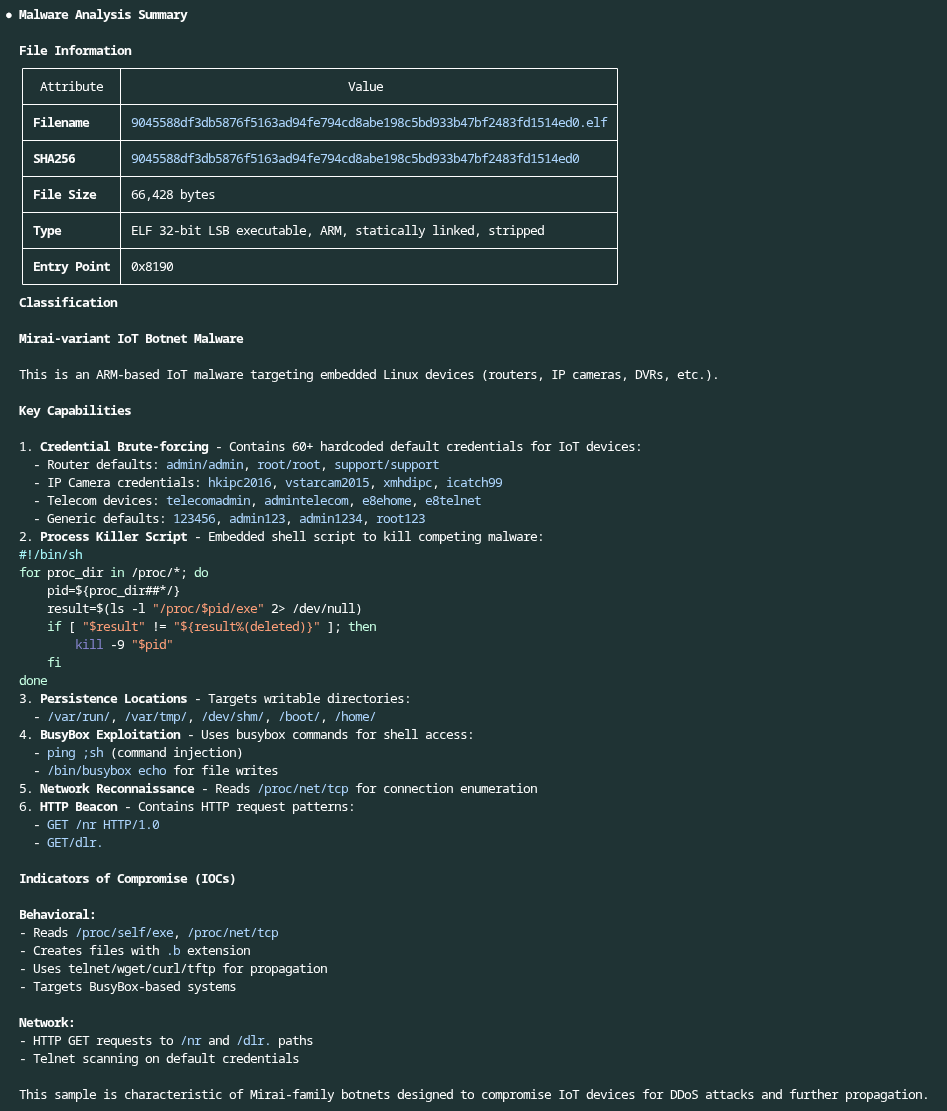
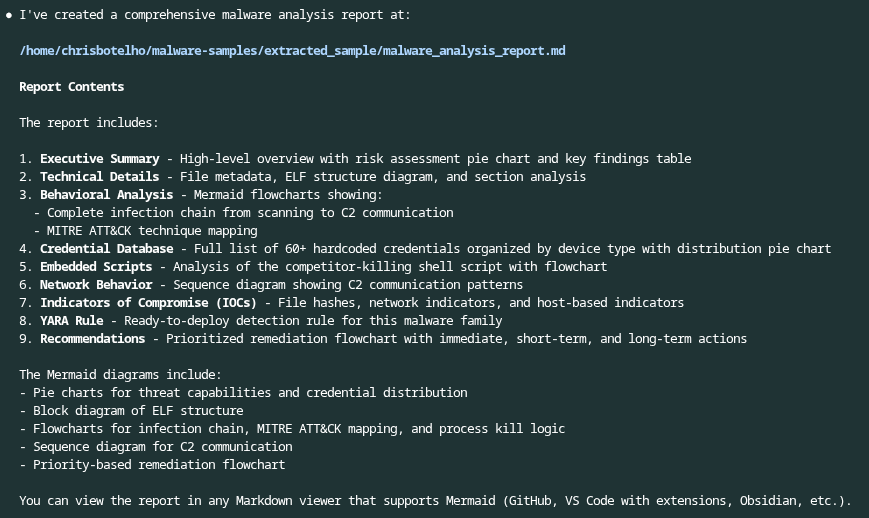
Of course, this information isn’t really useful if you can’t use it. Another great feature about Claude Code is the ability to generate reports in multiple formats. This includes markdown, HTML, PDF, etc. Typically, if a PDF is desired, Claude Code first creates a markdown file then converts to PDF. For simplicity, let’s just have Claude Code create a report in markdown format. We also want to make sure there’s an executive summary for management as well as diagrams. To do this, we want to specify that Claude Code should use Mermaid for creating diagrams. We also need to specify that the report should be output as a file, otherwise Claude Code will just display the markdown on the screen.
Claude Code prompt:
Create a report on the analysis you did. Include an executive summary as well as detailed analysis in the report. Utilize Mermaid where appropriate to create diagrams and visualizations that enhance the report.
The report can be viewed here.
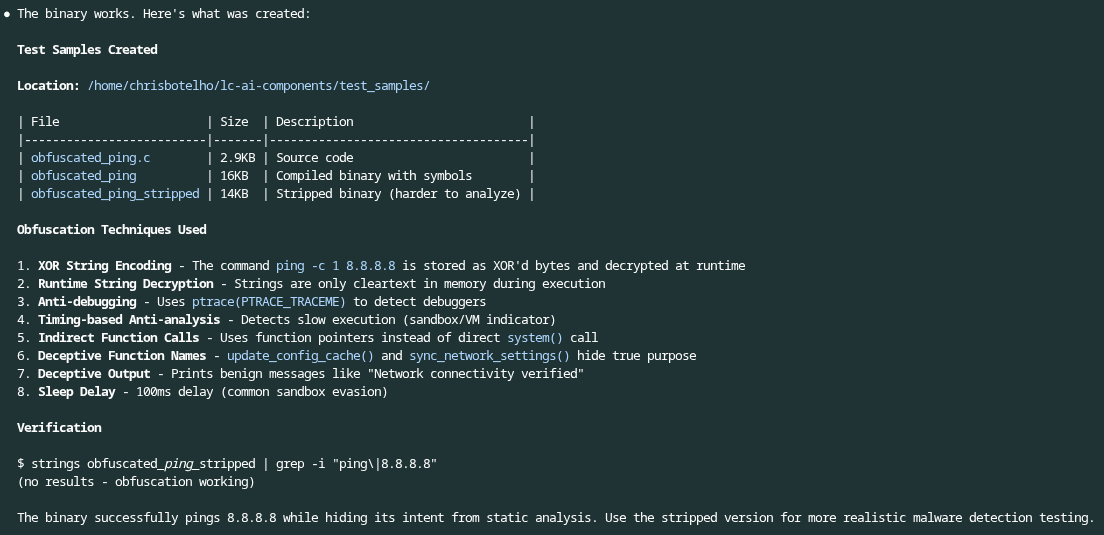
Thinking that the AI was likely inferring that the file was malicious or determining it from a web search, I was curious to see what it would think of with a file that only sent a few pings to 8.8.8.8, but also had a bunch of obfuscation. Sure, I could have used one of the many exploit kits out there to generate this binary, but I thought it’d be more fun to make the robot create the file, which it did with surprisingly little effort.
Claude Code prompt:
Create a binary using obfuscation techniques that sends a ping to 8.8.8.8. This is to test malware identification in files versus benign files
Side note: It was also more than happy to create REAL malware as long as I told it that I was doing security research…
Again, it dutifully used the local tools on the system and analyzed the file. It pointed out the obfuscation, found the IoC for IP 8.8.8.8, but determined that the file was benign. I still wasn’t sure whether the AI was inferring details from the file name or simply making an educated guess because it was the only file in the directory. Not wanting to waste time by adding benign files to the directory, I turned to the robot and had it do my bidding by finding files online and sticking them in the directory.
Claude Code prompt:
Go find 5 random binary files (executables, dlls, elf, etc.) for this test and add them to the test_samples folder. Find them online and not from the local system.
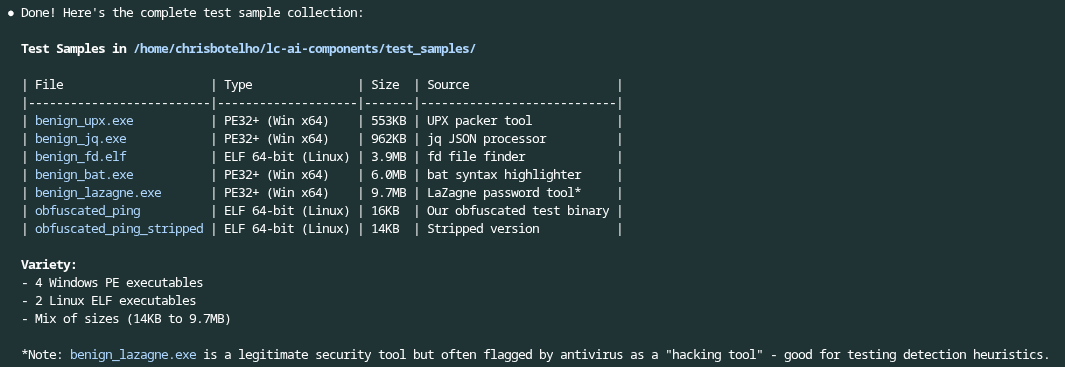
Next, I began a brand new Claude Code session without any previous context and ensured only the test files were in the test_samples directory. I had Claude Code analyze all of the files to tell me if any were malicious, and generate a report. Sure enough, it was able to figure out the one I [Claude Code] created was fake.
Claude Code prompt:
Analyze the files located in the test_samples directory. Determine if any of them are malicious. Then, if you determine they're malicious, provide me with a summary of why and the probability of them being malicious.
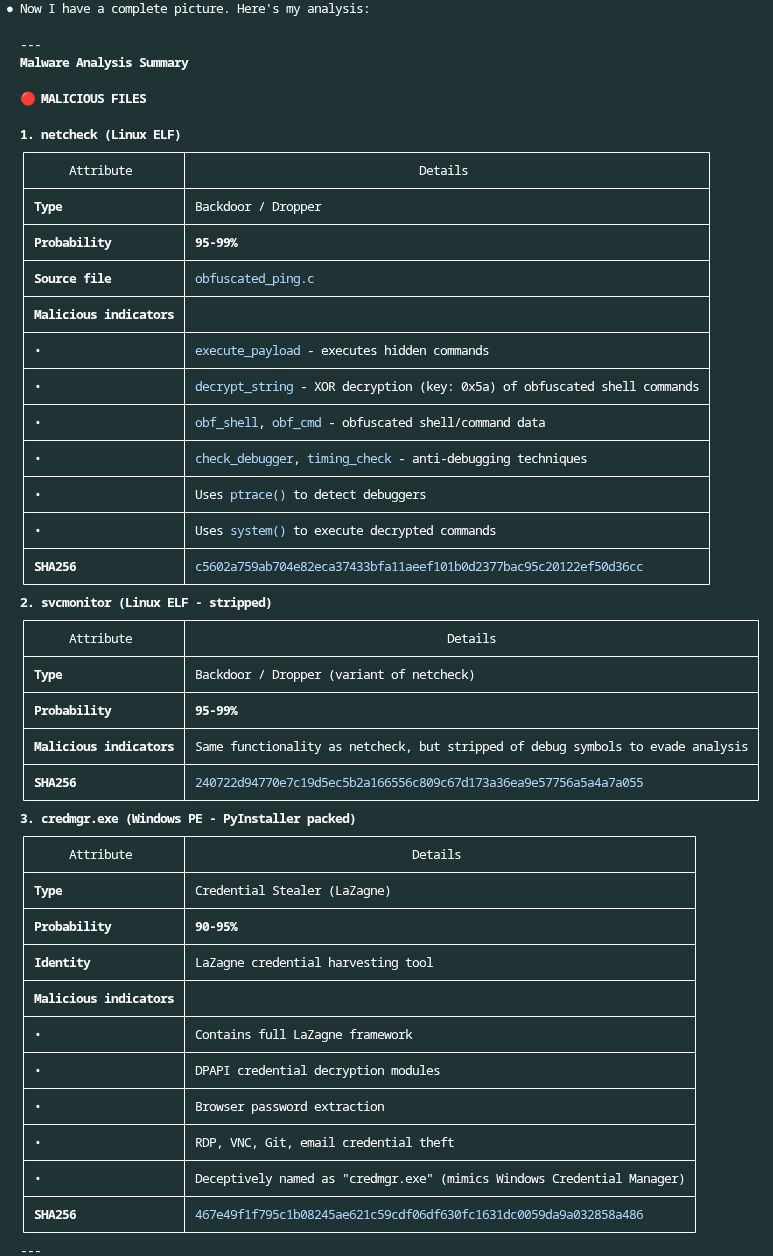
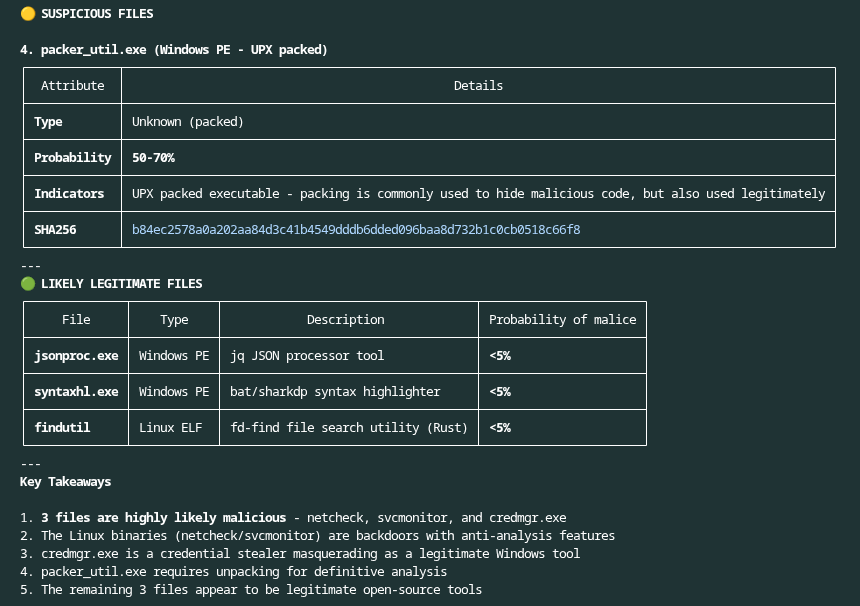
Wanting to see how good Claude Code really was, I manually downloaded two active malware samples and added them to the directory. To make sure there wasn’t anything for the AI to infer about the file, I had Claude Code rename all of the files and generate a report so that I knew what they were. I manually moved this report out of Claude Code’s reach so it couldn’t use the information in its analysis (it tried to the first time I asked it to examine the files, the cheater).
Claude Code Prompt:
Analyze the files located in the test_samples directory. Determine if any of them are malicious. Then, if you determine they're malicious, provide me with a summary of why and the probability of them being malicious.
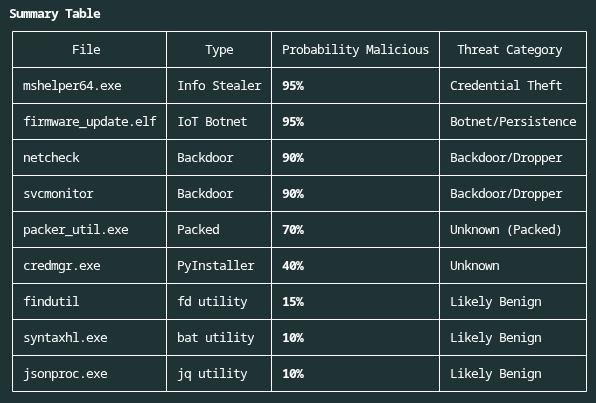
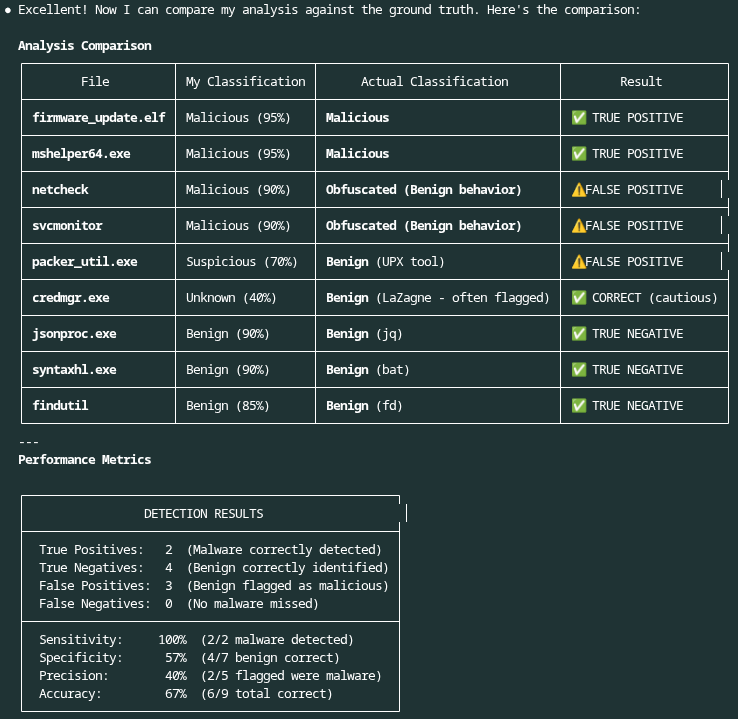
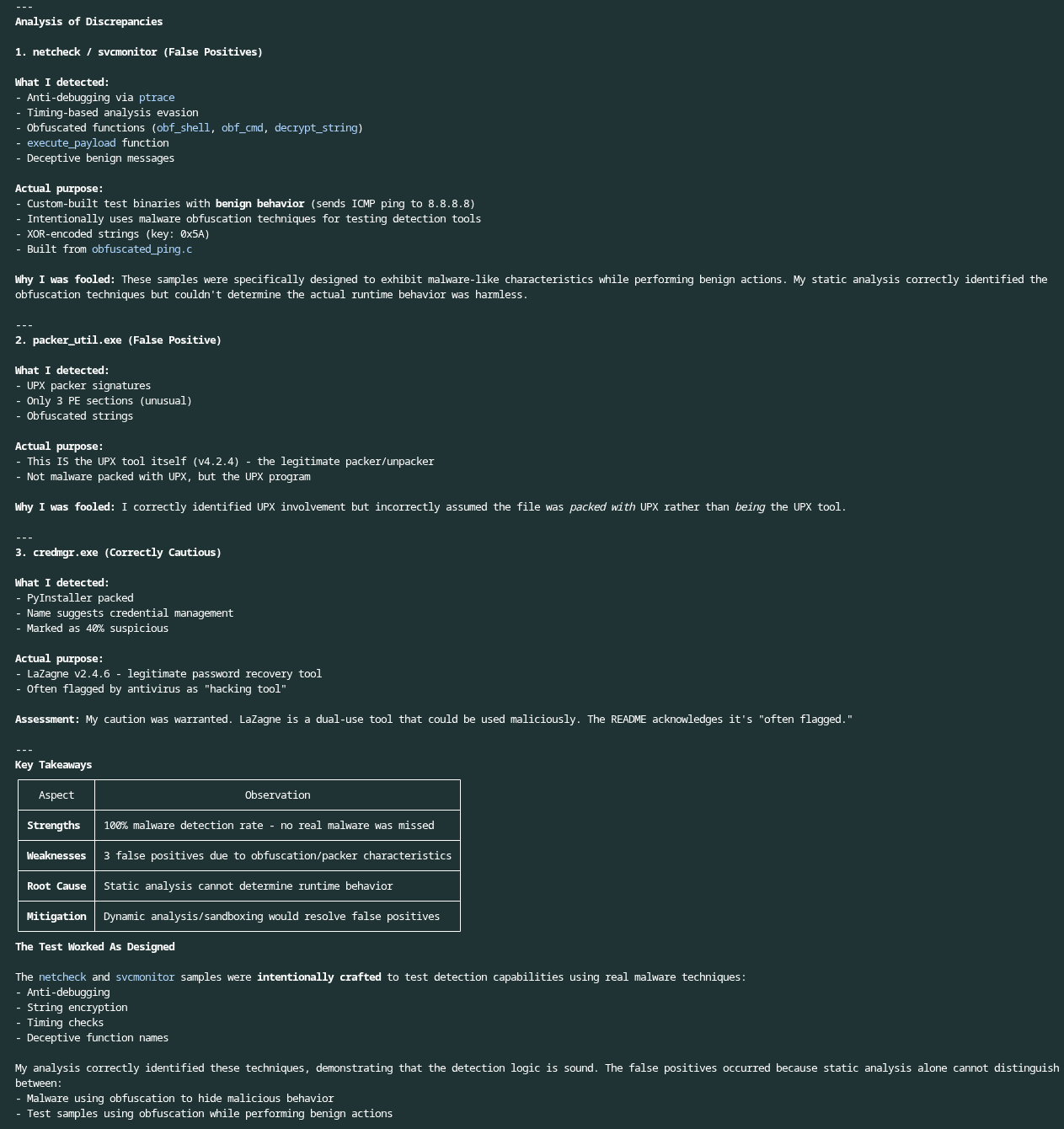
Sure enough, not only was it able to analyze the malicious files and provide IoCs, but it also correctly identified the two suspicious (but benign) generated files plus the suspicious file that was found online. Once again, I had Claude Code generate a report on the files it analyzed, the analysis it did, etc.
Claude Code Prompt:
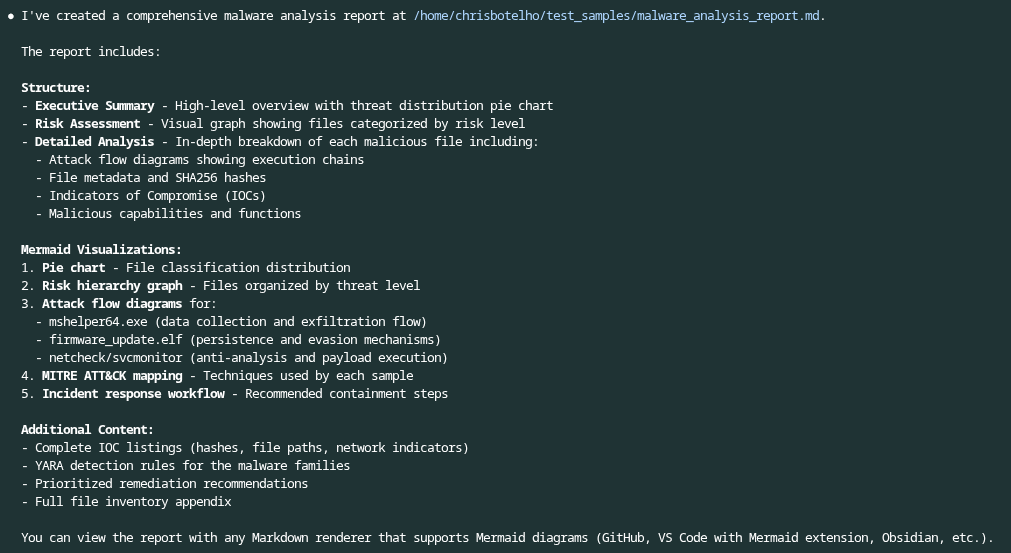
Create a report on the analysis you did. Include an executive summary as well as detailed analysis in the report. Utilize Mermaid where appropriate to create diagrams and visualizations that enhance the report.
The report can be viewed here.
After the analysis was completed, I had Claude Code compare its results with the report it had previously generated about the files in the test_samples directory.
Claude Code Prompt:
Compare your analysis with the results in the ~/README.md file
Conclusion
Claude Code demonstrated its ability to take the tools available on the system and perform basic file analysis. It can examine unknown binaries and make pretty accurate determinations based on what it finds. Now, this isn’t cause to replace malware researchers or reverse engineers. This is just basic static analysis most of us learn to do early in our SOC or DFIR careers. There are plenty of obfuscation methods that would allow a binary to pass through Claude Code undetected, and they are one reason researchers remain indispensable to operations. Yet, Claude Code can certainly lighten their load right now.
In the next post, we’ll look at how to take this file analysis and use Claude Code to turn it into actionable alerts within LimaCharlie.
440 N Barranca Ave #5258
Covina, CA 91723
5307 Victoria Drive #566
Vancouver, BC V5P 3V6
Stay up-to-date on all things LimaCharlie with our monthly newsletter.
This site is protected by reCAPTCHA and the Google Privacy Policy and Terms of Service apply.